Unreal Engine 5.6 Performance Highlights
The release of Unreal Engine 5.6 brings a lot of incredible performance improvements to the engine. In this alternative release notes I have filtered the list down to the most interesting optimizations and performance related changes. Where appropriate I have added my own notes, to explain more clearly or give context as these notes can sometimes be rather vague or short.
This is not every single optimization that made it into 5.6, instead primarily those that I think you should be aware, might change previous assumptions or require manual changes or CVAR tuning. You can find the original full release notes here.
Summary
The overall biggest highlights of this release are continued improvements to Unreal 5’s core render features of Nanite, Lumen (especially HWRT) and Virtual Shadow Mapping which are valuable to almost everyone. Further major improvements to renderer parallelization and other systems going more and more multi-threaded. World streaming with a new experimental plugin developed with CDPR and other scattered mentions of removed hitches and stalls from a variety of render related sources. A huge overhaul of the GPU Profiler and Insights GPU stats which add major enhancements to how we profile and reason about GPU performance.
Unreal Insights
- Added “ConsoleCmd” CPU scoped trace event for console input processing (includes the console command execution). The CPU timer has the actual command string as metadata.
- Improved the debug stats/counters for TraceLog:
- Added defines in TraceAuxiliary.cpp to easily enable/disable code for STAT, TRACE, LLM and/or CSV stats/counters.
- Added additional debug counters/stats:
- “Cache Unused”
- “Emitted not Traced”
- “Memory Error” (total - block pool - fixed - shared - cache).
- Added also trace counters API stats and made it default (instead of STAT counters).
- Added block pool, fixed buffers, shared buffers, emitted and traced stats also to the output of “trace.status” console command.
- Added initial zero values to all stats/counters (improves graph display in Insights for all the stats).
- Simplified code re registering EndFrame callbacks.
- Added support for registering a callback to be called each time TraceLog updates: added OnUpdateFunc in UE::Trace::FInitializeDesc + added UE::Trace::SetUpdateCallback(func).
- The new trace update callback is now used to emit stats/counters also during engine initialization. Once the engine finishes the initialization, the stats counters will be emitted only once per frame (by resetting the update callback and further emitting stats from end frame updates).
- CpuProfilerTrace: (”cpu” trace channel)
- Added support for FName variants of CpuProfilerTrace macros:
- for TRACE_CPUPROFILER_EVENT_SCOPE_STR (when the provided event name does not change)
- for TRACE_CPUPROFILER_EVENT_SCOPE_TEXT (when the provided event name is dynamic).
- FEventScope and FDynamicEventScope can also be initialized now with an FName.CpuProfilerTrace:
- Added variations for _STR macros (_STR_ON_CHANNEL_CONDITIONAL vs. _ON_CHANNEL_STR_CONDITIONAL vs _ON_CHANNEL_CONDITIONAL_STR).
- Added support for FName variants of CpuProfilerTrace macros:
- Add ability to show callstacks for bookmarks in Unreal Insights. Enable
callstack,module,bookmarkchannels to gather this information from the tracing target. - Add optional profiler hooks in TraceLog, and instrument common worker thread functions.
- Stats: Support flags in lightweight stats
- This re-uses existing declaration macros (that were previously only utilized when STATS is 1) to define lightweight structs containing information about the stat such as the flags and group.
- This allows us to do things like properly filter out verbose stats when profiling in the Test config (where STATS is 0).
- Added tracing for all LLM tag sets (assets and asset classes).
- CounterTrace: Added more options to set value for a trace counter:
- TRACE_COUNTER_SET_IF_DIFFERENT(CounterName, Value)
- TRACE_COUNTER_ADD_IF_NOT_ZERO(CounterName, Value)
- TRACE_COUNTER_SUBTRACT_IF_NOT_ZERO(CounterName, Value)
- TRACE_COUNTER_SET_ALWAYS(CounterName, Value)
- TRACE_COUNTER_ADD_ALWAYS(CounterName, Value)
- TRACE_COUNTER_SUBTRACT_ALWAYS(CounterName, Value)
- These can be used no matter how counter is created (“checked” or “unchecked”).
- Allow platforms to filter modules included in callstack tracing.
- Timing Regions now support an optional second parameter to specify a category (Regions macros and
FMiscTrace::OutputBeginRegion). This allows filtering and grouping in the Insights Frontend. - CsvProfiler - Report explicit event wait names as trace scopes.
- MemoryTrace: Fixed memory tracing to enable tracing of tags and mem scope with “memalloc” channel (and not with “memtag” channel which is used to enable tracing from LLM).
- Remove FName block allocations and TextureManager construction from contributing to the MemQuery/Memtrace asset memory cost readings, increases the precision of per-asset memory consumption reports.
- Marked the Profiler* modules as deprecated. The old Profiler has actually been deprecated since UE 5.0, superseded by Trace/UnrealInsights.
- Deprecate TraceDataFilters plugin because the functionality has been moved to the Trace Control Widget from Session Frontend and the Live Trace Control Widget from Unreal Insights.
- Audio: Added Unreal Insights asset scopes for MetaSound building and rendering memory use.
- Mass: Added Mass trace channel for MassEntity Unreal Insights plugin
- Adds a data stream type for Trace analysis which allows a runtime to connect directly to the analysis session, bypassing UnrealTraceServer. The session is analyzed directly in memory and not stored on disk. The direct socket connection is using a different port than the standard networked trace connection, to avoid collisions with UTS. It is only available for local connections and in the same process.
Insights Asset Memory Profiling (Experimental)
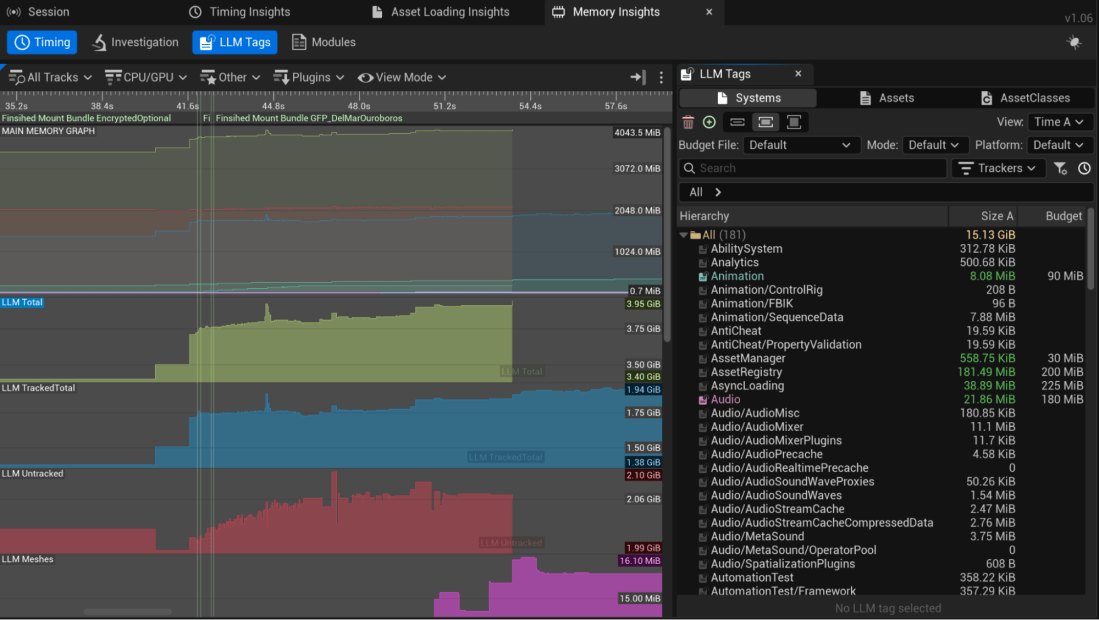
In Unreal Engine 5.6, Insight Profiling introduces a new (experimental) Low Level Memory (LLM) tracing of assets within your projects. Launch your client with the appropriate arguments to enable asset memory tracing on your game client. The functionality includes:
- The ability to define per platform memory budgets per asset type- See the LLM Timeline / TagSet TreeView.
- Switch analysis between TagSets, specifically the System, AssetClass, and Asset TagSets.
- Sort TagSets entries by name and size
- See all the entries and associated budgets per TagSet, anything out of budget is clearly indicated.
- A/B comparison of memory usage from one frame to another.
GPU Profiler 2.0

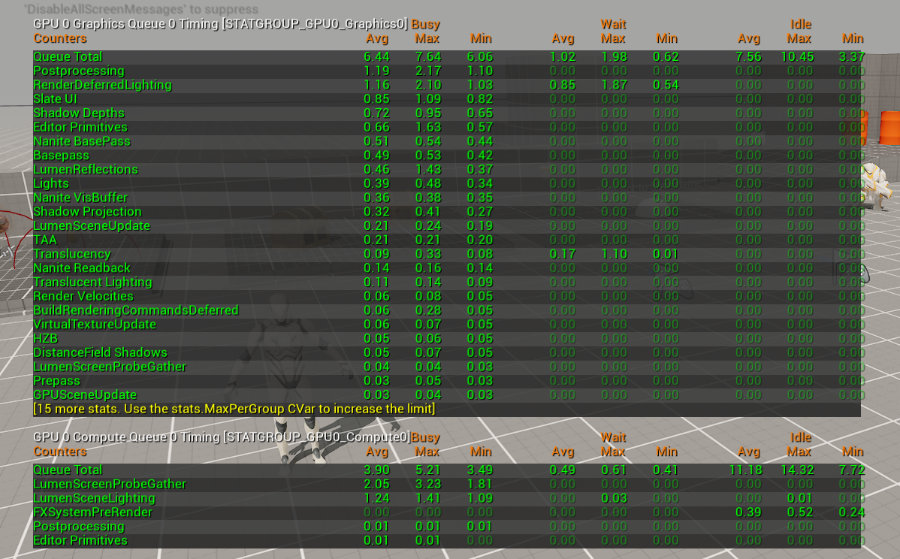
Unreal Engine 5.6 introduces a re-architected Insights GPU profiler.
The goal is to unify existing profiling systems within the engine (Stats, ProfileGPU, Insights) to use the same data stream increasing its reported accuracy and consistency when profiling a scene.
We overhauled the way timestamps are collected for the GPU timeline and have all the RHI’s produce this information in a common format. The new event stream and Insights API improvements surface more information in the new GPU profiling tools:
- async queue, multi GPU, pipeline bubbles (GPU idle/busy states), cross-queue dependencies (fence waits)
This overhaul does remove the convenient in-editor ProfileGPU UI pop-up unfortunately. Thankfully, Epic massively improved the detail of the log dump during profileGPU command to compensate.
Within Unreal Insights you’ll find the biggest improvements as you now see two GPU tracks one for Graphics and another for Compute which is HUGE for understanding your GPU performance. In pre-5.6 you couldn’t properly reason about the GPU stats as things such as Async Compute were not displayed properly. Additionally, stat GPU would not clearly differentiate what runs as async compute either, making the stats somewhat misleading and difficult to reason about.
I’ve included examples of the new stat GPU and log output from ProfileGPU console command.

Renderer Parallelization
Render Thread performance is very often the limiting factor for UE titles. This is because previously some operations were restricted to this particular thread, even though current platforms and graphics API provide methods for them to be done in parallel. We improved performance by refactoring the Renderer Hardware Interface (RHI) API to remove these constraints and fully utilize the multithreading capabilities of the target hardware.
Virtual Shadow Maps Optimizations
Virtual Shadow Maps in Unreal Engine 5.6 further improves on shadow performance and memory usage with optimized scene culling while increasing fidelity and artistic control.
Detailed Changes
- Implemented VSM per-instance deforming state tracking on GPU such that we can know when an instance switched state on the GPU and trigger invalidation.
- Added receiver masks that can improve clipmap culling effectiveness significantly for dense scenes, especially with a dynamic light. Disabled by default and can be enabled using
r.Shadow.Virtual.UseReceiverMask. There’s a potential for artifacts when used withr.Shadow.Virtual.MaxDOFResolutionBias. - Added per-chunk aggregate of shadow casting flag and early out in the chunk culling to improve culling efficiency.
- Fixed the pre-cull instance counts for nanitestats virtualshadowmaps and optimized the loop iteration by using bit logic to skip empty bits.
- Set clipmap far culling plane to just beyond the visible range when force invalidate is enabled, greatly reducing rendered geometry in some cases. Can be disabled using
r.Shadow.Virtual.Clipmap.CullDynamicTightly(default true). - Skip queuing cache invalidations for dynamic geometry when receiver mask is enabled
- Update some VSM options for best current paths:
- Remove ability to turn off StaticSeparate as it is fairly integral to how the fast path caching logic works now.
- Ensure
r.shadow.virtual.cache 0also enables the fast “uncached” paths on the nanite view - Remove mode “1” for VSM nanite and non-nanite HZB. Only two pass occlusion culling on the current frame is supported. Not yet enabling receiver mask by default due to some memory overhead, but that is the intended path moving forward.
- I cannot find
r.Shadow.Virtual.Cache.StaticSeparateany longer in 5.6, so this might be forcefully enabled from now. That does impact memory usage as it doubles it compared to having it disabled.
- Support receiver mask for local lights (disabled by default, see r.shadow.virtual.usereceivermasklocal)
- Requires using non-greedy mip selection when enabled for SMRT and single sample lookups
- Cvar to enable/disable VSM overflow screen messages (enabled by default)
- Add force invalidate local cvar
- Remove greedy selection clipmap cvar; has been off for a while and increasingly clashes with the dynamic geo optimization strategies (receiver mask, etc)
- Optimization to skip/simplify VSM light grid pruning when there are no VSM local lights
- VSM: Support receiver mask with caching enabled.
- When enabled via r.Shadow.Virtual.UseReceiverMaskDirectional, receiver mask will be used for all dynamic pages (which will thus become uncached as it is unsafe to cache partial pages), but static pages can remain fully cached.
- This is generally a benefit to most applications as relatively static objects should migrate to the static pages, while dynamic pages are frequently invalidated every frame.
- VSM Dynamic Z range tight culling when using receiver mask
- Normalize a few default High scalability VSM settings across platforms.
- This ties back in with the new 60Hz Scalability Profiles that got tweaked this release.
Lumen
Lumen Hardware Ray Tracing Optimizations
In Unreal Engine 5.6, Lumen Hardware Ray Tracing (HWRT) mode delivers even greater performance on current-generation hardware. These low-level optimizations ensure faster, more efficient rendering, bringing high-end visual fidelity and scalability that now matches the frame budget of the software ray tracing mode. This frees up valuable CPU resources on your target platform and overall helps achieve a more consistent 60hz frame rate.
Detailed Changes
- Lumen Scene Update CPU performance optimizations
- ShortRangeAO is now running at half resolution with a denoiser. This makes it two times faster on console
- Lumen Far Field Optimizations making Far Field 30% faster on console and ~50% when using new occlusion only far field mode (Added r.LumenScene.FarField.OcclusionOnly 1)
- Added Single Layer Water reflection downsampling and denoising. Downsampling allows to scale down water reflections and denoising allows to make them more stable.
- Reworked Lumen Reflection radiance cache. It can now sample sky directly for higher quality (r.Lumen.ScreenProbeGather.RadianceCache.SkyVisibility) and has better controls where it needs to be applied
- Unclear whether this has associated performance gains with it, but it sure sounds good.
- Implement basic SER support for HitLighting and ray traced translucency This can improves performance on hardware that supports SER on scenes that use hit lighting and have many materials. This feature is controlled by the cvar: r.Lumen.HardwareRayTracing.ShaderExecutionReordering
- Lumen Surface Cache update is now driven by distance to frustum. This allowed to half number of updated pages making it two times faster without a large impact on the GI update speed on High scalability
- Disable DistanceFieldRepresentation bit when HWRT is used with Lumen. This saves ~0.07ms (1080p, console) on skipping CopyStencilToLightingChannelTexture and skipping reading this bit during ScreenProbeGather and ShortRangeAO tracing.
- Added r.Lumen.ScreenProbeGather.IntegrateDownsampleFactor.
- It allows downsample Screen Probe Gather integration which makes this pass ~3 times faster (~0.3-0.5ms speedup on console 1080p, depending on the content).
- Downsampled integration is pretty stable thanks to jittered and irregular sampling patterns, upsampling based on depth and normal, and full resolution temporal accumulation.
- The downside is that it does remove some of the fine grained normal detail making it blurry, so for now it’s not enabled by default
- Wew ray weighting for Lumen Reflections. It improves reflection stability on some features and speeds up reflection pass
- Lumen performance visualization view now uses different color brightness for different roughness ranges
- Lumen Screen Probe Gather fast out optimizations for quickly skipping sky pixels.
- New Lumen Screen Probe Gather adaptive probe placement algorithm. Major GI optimization due to ability to place less adaptive probes while retaining similar visuals
- Lumen Surface Cache Radiosity pass optimizations
- Reduce Lumen Reflections output format to 32 bits. This saves 0.02ms in Lumen Reflections and 0.03ms in Water Rendering on console at 900p
- Changed Lumen default settings.
- SWRT detail traces (mesh SDF tracing) is now a deprecated path, which won’t be worked on much.
- Important note! It’s also really important that Lumen eventually reaches a single path so developers can focus on HWRT entirely and not re-author content for multiple configurations.
- For scaling quality beyond SWRT global traces it is recommended to use HWRT path instead Firefly filtering is now more aggressive by default (
r.Lumen.ScreenProbeGather.MaxRayIntensity10 instead of 40). - This removes some interesting GI features, but also reduces noise, especially from things like small bright emissives.
- SWRT detail traces (mesh SDF tracing) is now a deprecated path, which won’t be worked on much.
- Fixed async compute overlap when async Lumen reflections are enabled
- Fixed Lumen Radiance Cache cache update time splicing causing major performance spikes on fast camera movement or disocclusion
Nanite
- Added explicit chunk bounds to instance culling hierarchy and used those to make it possible to store and update only the bounds for the dynamic contents of a cell. This improves performance in CitySample by some 100us (which had regressed when we switched dynamic geometry to be “cullable”).
- Fixed distance culling bug for Nanite rendering into CSM, where it would not set up the culling view overrides correctly leading to issues with e.g., per instance cull distance (foliage).
- Added specialization for single-view case (visbuffer) for the chunk based instance cull shader allowing the compiler to remove the loop and significantly lower register pressure.
- Added specialized instance cull for static geometry to reduce the cost as well as register pressure. Disabled by default due to potential failure modes (
r.Nanite.StaticGeometryInstanceCull). - Added aggregate instance draw distance and culling to hierarchy cells and chunks. This can be a significant win in scenes with many small instances that use per-instance culling ranges.
- Not entirely clear, but this likely affects foliage rendering the most as normal nanite meshes don’t support max draw distance or similar.
- Changed hierarchical instance culling to work on chunks of 64 instances rather than on cells and support culling GPU-updated instances. Significantly improves instance culling in many cases, especially scenes with large amounts of GPU-generated PCG instances.
- Bugfix: Fix regression of LOD generation (when Nanite is enabled) that would allow meshes with low poly counts to simplify too much in generated LODs and destroy their silhouettes.
- Perhaps time to verify all your fallback meshes (used for collision geo, lumen HWRT among other things!) that none have lost their silhouettes.
- Updated Nanite Software VRS to respect the per-material “Allow Variable Rate Shading” checkbox.
Lighting
- Ray Tracing: Add debug visualization for flags and masks Add new picker domains to visualize the unique flag and mask settings throughout the scene. This can be used to validate which modes are being used. In particular this is useful to track down materials that require any-hit shading.
MegaLights
- Exposed
r.MegaLights.DownsampleFactor, which allows to change between 1x and 2x donwsampling factor for scaling quality up
Niagara
- Add a mesh LOD option to use the component origin as the source of the LOD calculation
- This is more stable if you have dynamic bounds and allows for a single mesh to be rendered vs per particle LODs
- Enable Niagara Editor Performance Stats for new VM
- The new VM doesn’t breakdown per module and will only display information for each stack group
- As far as I know, Niagara has been working on a new Virtual Machine for math calculations (The VM allows the same math/code to run on both CPU and GPU which makes swapping these modes so seamless for us as devs).
- When using performance mode disable “compile for edit” to ensure performance measurements is more accurate
- One measurement I made was ~40% delta between edit mode and none edit mode
- There is a separate option to enable edit mode for profiling
Niagara Heterogeneous Volumes
Unreal Engine 5.6 is production-ready and brings further optimizations in downsampling and runtime performance on PC and 9th generation consoles.
- Bilateral upsampling is now employed when rendering at downsampled resolution.
- Expensive operations such as evaluating fog in-scattering and indirect lighting have been approximated to lower VGPR pressure and tighten the main ray marching loop.
- Calculation of indirect lighting is optionally performed within the lighting cache calculations to reduce ray marching complexity and lower VGPR usage.
- Fog in-scattering is optionally lifted out of the main ray marching loop and interpolated to improve real-time performance.
- Hardening of the Heterogeneous Volume component allows for more robust operation when running in-game.
- Beer Shadow Maps are optionally employed when mixing with translucent rendering; an approximation but more performant for real-time applications
Rendering / RHI
- Stat unit now displays the current render resolution
- This is actually useful to see reported clearly in viewport.
- Changed the shadow fade out to depend on the shadow resolution scale to give greater control over how individual lights fade out their shadow, the old behavior can be enabled by turning off “
r.Shadow.DoesFadeUseResolutionScale”.- Looking at the code, this is for non-virtual shadow mapping.
- Allow light culling to be run on async compute.
- Made the light grid feedback pass also run on the async queue to prevent it from causing a sync.
- Quantized Automatic View Texture Mip Bias to significantly reduce the number of independent sampler states used when Dynamic Resolution is enabled, preventing crashes in long-running applications that hit the sampler limit.
- Number of quantization steps is controlled with
r.ViewTextureMipBias.Quantization(defaults to 1024).
- Number of quantization steps is controlled with
- Added support for reserved resources for the GPU-Scene instance data buffer to remove the need to perform copies on grow/shrink, reducing hitches and peak GPU-memory use. Disabled by default, may be enabled using e.g., r.GPUScene.InstanceDataTileSizeLog2 12 on supporting platforms.
- Add per-group auto LOD bias for finer control.
- TSR- Improve the temporal stability of thin geometry like foliage and hair rendering (controlled by
r.TSR.ThinGeometryDetection, off by default). It should largely reduce patch flickering.- Use r.TSR.Visualize 15 to visualize edge line (red), partial coverage (green), and others (yellow). Only red and green regions have stability improved.
- DX12: Fix a case where a temporary staging texture free wasn’t being traced, which resulted in Memory Insights reporting ever-growing memory usage.
- Fix memory leak due to unreleased ref. count on skeletal mesh LOD data.
- PSO: Fixed a bug in PipelineStateCache::GetAndOrCreateComputePipelineState that would trigger an unnecessary stall on the render thread. Precached PSOs should not be added as a dispatch prerequisite on the RHI command list, since they aren’t used for drawing.
- Additional PSO improvements have been made, but this mentioning fixing potential stalls sounded the most interesting.
Materials & Shaders
ListShadersconsole command added, similar toListTextures, for runtime analysis of shader memory / loads.- Change default value of
r.VT.PageFreeThresholdfrom 60 to 15. This has been seen to be a better default setting on a range of internal projects. It reduces pool residency on fast camera movement which can slow down page production causing pop in. - Change default Virtual Texture behavior in cooked builds to not wait on render thread for root pages to be mapped. Instead we read from an average fallback color generated during texture compilation. This removes render thread hitches.
- Materials now can opt themselves out of Static Mesh vertex factories. This is an advanced option, defaults to true, and can be used to reduce vertex factory compilations and memory. Useful in UI, Niagara, Skeletal Mesh, and other materials when a material will not ever used on a Static Mesh.
- Added a new cook artifact (shadertypestats.csv) that can be used for more granular tracking of shader/shader type growth over time.
- It contains, for each shader type, both the number and total memory size of all unique shaders, prior to chunking.
- Note that isn’t directly representative of final shader memory/disk size since it doesn’t account for shader library deduplication, or shader library chunk re-duplication (the case where multiple shadermaps which would have shared bytecode end up in different chunks).
- This artifact is saved to both the root of the ShaderDebugInfo folder for each cooked shader format, and also renamed to include the shader format name and saved in the Metadata folder for a cooked build.
- Add CPU distance based streaming for virtual textures. Virtual textures can opt into having mip levels streamed using the existing regular texture streaming logic. A budget is configured using r.Streaming.PoolSizeForVirtualTextures.
- Add a VirtualTextureStreamingPriority setting to TextureLODGroup and Texture assets. We use it to prioritize when collecting virtual texture pages to populate.
RHI - Bindless Resources
Bindless resources are a low-level feature related to the management of textures and other types of data buffers in modern Renderer Hardware Interfaces (RHIs) such as DX12, Vulkan, and Metal. We added support for bindless resources to provide the means for more flexible GPU programming paradigms and additional features within the renderer, and as a requirement for full ray tracing support on Vulkan.
While not a direct user-facing feature, support for bindless might be of interest to some users writing C++ plugins and custom engine modifications relevant to rendering.
Optimized Device Profiles for 60Hz
Unreal Engine 5.6 provides out-of-the-box, up-to-date device profiles that reflect Epic Games’ Fortnite-optimized settings to achieve 60fps on all supported platforms.
Procedural Content Generation (PCG)
There is a a lot of optimizations in the release notes that you may want to dive into (See PCG Section) when you heavily use PCG.
- Added fine grained time slicing to compute graph dispatch to help stay within execution budget.
- Optimized dispatch of GPU graphs to reduce game thread cost.
- Optimized runtime generation to reduce game thread cost.
- GPU Grass & Micro Scattering: Added support to PCG GPU compute for sampling the Landscape RVT and Grass maps directly on GPU in order to build efficient and customizable runtime grass spawning.
- GPU Compute Performance Improvements
- Reduced overall memory consumption when working with PCG.
- Improved the PCG Framework execution efficiency for both offline in-editor and runtime use cases.
- New Experimental PCG Instanced Actor interop plugin to spawn and take advantage of the instanced actor system.
Animation
- Optimize RigLogic for low LOD evaluation (targeting low-power devices), bringing a 30-40% performance improvement
- Optimized RichCurve evaluation
- Optimized skinned mesh proxy creation
- Added memory usage estimate during animated curve compression
- Bugfix: Fix missing fast path icons for blend space nodes
- Added option to disable animation ticking when a skeletal mesh is directly occlusion/frustum culled
- Fix incorrect comparison of VisibilityBasedAnimTickOption in AnimationBudgetAllocator.
- Allowed post process Animation Blueprints to be applied based on a LOD threshold per-component
- Fixed OnlyTickMontagesAndRefreshBonesWhenPlayingMontages option updating the anim instance multiple times
World Streaming
A MAJOR improvement for world streaming called Fast Geometry Streaming Plugin is now Experimental in 5.6. This is a huge collaboration between Epic and CDPR to fix some long standing issues with streaming in large and complex open worlds. The full notes contain a LOT of detailed settings and CVARs to enable, so I’ll link directly here. Instead I’ll list some highlights that you should definitely look into.
- Allows tuning of streaming budgets per frame for things such as AddToWorld, RemoveFromworld and mesh streaming. (See full notes on what budgets they used for CitySample)
- Asynchronous physics state creation/destruction.
- This is huge for relieving the GameThread during streaming/spawning of actors.
- Improved RemoveFromWorld or “Incremental EndPlay”.
- Unified/Shared Time Budget for ProcessAsyncLoading and UpdateLevelStreaming
This is a major step towards excellent (open world) streaming that I am excited to see evolve into Production Ready as soon as possible.
Chaos Core
Epic worked on the following Core Solver optimizations:
- Partial sleeping islands
- Scene query improvements
- Simulation initialization improvements
- Multithreaded collision detection and solving
- Multithreaded island generation
- Network physics development
There wasn’t a lot of specific perf related details on the above improvements. Here are some misc. interesting notes I found:
- Added a cvar (
p.Chaos.PreviewWorld.DebugDraw.Enabled) to allow enabling/disabling chaos debug draw on preview worlds - Added experimental asynchronous execution of Dataflow graphs (It can be toggled on from the Evaluation button options menu)
- Enable some
p.Chaoscvars in Shipping so they can be used to tweak game-specific performance. - Physics Replication LOD (Experimental)
- Interface that allows for custom LOD solutions.
- A base implementation of an LOD solution, disabled by default. Transitions replicated physics objects between replicated timelines and replication modes (predictive interpolation to resimulation) based on distance from focal points / particles.
- Project Settings and CVars for settings (p.ReplicationLOD)
- API to register focal points / particles in the LOD via AActor, UPrimitiveComponent or directly via the LOD interface on both Game Thread and Physics Thread.
- Option to register autonomous proxy in LOD via the NetworkPhysicsSettingsComponent.
Core
- Add an experimental thread sanitizer that can be run on the Windows platform.
- Thread Sanitizers are helpful in debugging data races in multithreaded programming. There is no further info on this at the time…
- Add LoadAsync wrappers to TSoftObjectPtr and TSoftClassPtr to better expose it as an alternative to LoadSynchronous
- Add a local queue in the scheduler for the game thread to improve its task queuing efficiency
- Expect this to improve TaskGraph code which also runs to handle all Ticks etc. on the GameThread.
- FileHelper: Add LoadFileInBlocks for TryHashFile and other similar performant reading of files.
- WorldPartition::GetStreamingPerformance() now reports streaming performance also for non blocking cells/sources.
- Poor streaming performance caused by blocking cells/sources take preference over poor streaming performance from non blocking cells/sources.
- The thresholds for reporting streaming performance from non-blocking sources can be configured via “wp.Runtime.SlowStreamingRatio” and “wp.Runtime.SlowStreamingWarningFactor”.
- GetStreamingPerformance also reports an additional enum for streaming performance (“Immediate”) that triggers when sources are within unloaded cell content bounds.
- Added a CVar:
LevelStreaming.LevelStreamingPriorityBiasthat can be used to offset level streaming LoadPackageAsync request priorities (added to the levels calculated StreamingPriority). - Add A
sync.ParallelFor.DisableOversubscription(defaults to false) cvar which specifies if parallel for requests can spawn additional threads when waiting for spawned tasks to finish. - Fix performance regression for the loader at runtime that might check for file existence on disk even for packaged builds
- Added a way to override the EAllowShrinking defaults. (TArray)
- Added a new define UE_UOBJECT_HASH_USES_ARRAYS that replaces FHashBucket in UObjectHash implementation with a one that uses arrays instead of sets. This reduced memory consumption by ~20%. Please note that this might reduce performance in some corner cases. This will be addressed in a future engine update.
Mover Plugin: Performance Improvements
To scale with large crowds and demanding gameplay scenarios, we’ve introduced threaded simulation that enables the Mover plugin to run asynchronously off the game thread. Input gathering and simulation are now decoupled, enabling concurrent movement updates across many actors.
While this threading model is currently limited to single-player contexts, it lays important groundwork for future support in networked scenarios. The Mover plugin continues to evolve as a flexible, high-performance solution for both player and AI movement.
- Mover 2.0: Adding NavWalkingMode to support more efficient walking movement for actors using a navmesh.
Mover 2.0 has other performance improvements in this release that I have omitted from the highlights for nav walking, state caching and memory usage. Search for “Mover:” in the original release notes for more.
Gameplay
- Improvements to the performance and thread safety of the
tick.AllowBatchedTickssystem first added in 5.5.- This system is intended not to batch the same tick functions, but instead batch tick functions inside single TaskGraph tasks to reduce the overhead of that system instead.
- Change ticking to use ProcessUntilTasksComplete to periodically call an update function while waiting for tasks on other threads. Added tick.IdleTaskWorkMS cvar to control this, if > 0 the game thread will spend that many milliseconds trying to process other work (like worker thread tasks) when the game thread is idle
- Add an optional deferred component move handler (
s.GroupedComponentMovement.Enable) on the UWorld to allow scene components to request movement to be propagated later on the frame as a larger group of updates to help improve performance.- This sound incredibly useful to automatically defer FScopedMovementUpdate calls to be batched together later in the frame.
- Character & Projectile Movement Components do not use this grouped update behavior at this time as it requires specifying the scoped movement with EScopedUpdate::DeferredGroupUpdates instead of the current EScopedUpdate::DeferredUpdates
- Add LevelStreaming.VisibilityPrioritySort to change the order that it processes level streaming adds and removes
- Added a new (experimental) TaskSyncManager to the engine which allows registration of globally accessible tick functions that can be used to synchronize different runtime systems and efficiently batch per-frame updates.
-
Added support for manual task dispatch to FTickFunction so functions can wait to be triggered halfway through a tick group. If
tick.CreateTaskSyncManageris enabled, it will create the manager at startup and register sync points that are defined in the Task Synchronization section of project settings. RegisterWorkHandle can be used to request work at a specific sync point, and RegisterTickGroupWorkHandle can be used to request work to run on the game thread during a tick group. The TickTaskManager was modified to support this system and other methods for improving tick performance - Introduced a shared time budget for ProcessAsyncLoading and UpdateLevelStreaming that can be enabled with
s.UseUnifiedTimeBudgetForStreaming 1.When this is set, it runs the async asset and level streaming at the end of the frame from HandleUnifiedStreaming which also handles high priority streaming. UpdateLevelStreaming will have less time if there are hitches in ProcessAsyncLoading, and time unused by UpdateLevelStreaming will be used to process more loaded assets.
Blueprint
- Blueprints will now have their Tick function disabled if it’s empty.
- A nice to have automatic optimization that will reduce overall overhead when you have not done this basic clean up yourself.
Mass
- Allow Mass phases to run outside the game thread
- Mass can now optionally auto-balance parallel queries. This comes at a slight scheduling overhead, but can improve performance for processors that don’t have even performance for all their chunks.
- Made instances with settings of MaxActorDistance == 0 never hydrate, including as a response to physics queries. This makes never-hydrating InstancedActors a lot cheaper. The new feature is disabled by default and is controlled by IA.EnableCanHydrateLogic console variable.
- Made FMassProcessingPhase.bRunInParallelMode
trueby default.- Also switched application of changes to
mass.FullyParallelfrom taking place in FMassProcessingPhaseManager::OnPhaseEnd to FMassProcessingPhaseManager::OnPhaseStart
- Also switched application of changes to
Game AI
- Activate PathFollowingComponent ticking only when necessary
- The call to OnActorRegistered in NavigationSystem from AActor::PostRegisterAllComponents will now handle registration for the actor and all its components. Component registration to the navigation system will be ignored until all components are registered to the scene to avoid extra work since actor registration will take care of it. The component specific operations are now only used after the initial registration (e.g., component added/removed/updated).
- This change fixes an issue exposed by the new registration flow when the NavigationElement is created and pushed with all the relevant data instead of relying on the callbacks when processing the registration queue. That delay was hiding the dependencies between some components.
- Navmesh - Fix: only spawn the navmesh for the world that was loaded.
AI Smart Objects
- Added partial multithreading support to be able to update/use/release slots from multiple threads. SmartObject instance lifetime is still single threaded and mainly controlled by components lifetime. The functionality is off by default and can be activated by setting
WITH_SMARTOBJECT_MTto 1- With it being off by default, you must compile the engine from source to enable this in 5.6.
State Tree
- Multithread access detection. Detect if 2 threads are accessing the same instance data. The validation can be deactivate with the cvar
StateTree.RuntimeValidation.MultithreadAccessDetector - Async RunEnvQuery Task
- Sound like we can now run environment queries asynchronously in the State Trees.
StateTree Scheduled Ticks and Performance
State Trees now support scheduled ticking, significantly reducing performance overhead by avoiding unnecessary updates. Instead of ticking every frame, State Trees will now only tick when needed — such as when a task requires it, an event occurs, or a delay completes. Tasks or states can also request specific tick intervals, enabling per-state throttling. Sleeping instances will automatically wake when relevant activity resumes.
This optimization can dramatically cut down CPU usage in complex games, especially when many trees are idle. Designers can see which states or tasks will tick through updated visual indicators in the editor and can toggle scheduled ticking per asset if needed.
StateTree: Asynchronous Task Support
We’ve expanded asynchronous task support through the WeakExecutionContext. WeakExecutionContext is lightweight and safe to copy. It provides a simple handle for async logic. When pinned, you have full access to instance data from within the async tasks, making it safe to read or modify task state asynchronously while preventing premature garbage collection. You are responsible for making its access thread safe.
Iris Networking System
Iris is the next-gen networking model of UE5 that is still in active development. This release includes foundational work such as:
- More robust replication of dynamic and nested objects, with improved support for complex actors and FastArrays.
- Improvements to network performance in high-bandwidth and low-latency conditions, with better bandwidth utilization and reduced replication latency for small objects.
Additional changes I found:
- Added support for recording CSV stats in AActor::ForceNetUpdate and AActor::FlushNetDormancy. Recording is only enabled in Non-Shipping builds and when compiling for Dedicated servers only.
- The new CSV Categories (Actor_FlushNetDormancy and Actor_ForceNetUpdate) are disabled by default.
- By default we record the NativeParentClass name of the Actor.
- The CVar: net.Debug.ActorClassNameTypeCSV, controls which type of class name to record:
- 0: Record the Parent native class name of the given Actor
- 1: Record the TopMost non-native class name of the given Actor
- 2: Record the Actor class name
- Network Insights - Display all HugeObject packet contents.
UMG
- Refactored widget animations to not use a player object anymore.
- This change removes the use of UUMGSequencePlayer except in places that require backwards compatibility. These player objects, and the IMovieScenePlayer interface, are getting deprecated in favor of more lightweight “runner” structs that can be easily packed in memory. A future optimization might even be to move all these runner structures into the UMG Sequence Tick Manager.
Editor & Development Iteration
- Oodle updated to version 2.9.13
- From Oodle Release Notes: “This release focuses on BC7 and BC7-RDO encoding speed.” Expect 25-30% encoding speed which is an excellent improvement for development iteration.
- Remove manifest from compiled DLLs as it was causing a delay for each module loaded to query WinSxS with an out-of-process call. This saved about 10s of boot time for ~2300 dlls loaded at editor startup.
- Just imagine the collective time this will save across all devs using UE5
- Added non-shipping tracking for ResetAsyncTrace Delegates
- The delegate dispatch step inside ResetAsyncTraces is now Timed, and if it’s above a defined threshold, we dump some key info about those delegates to help diagnose rare performance spikes.
-
Improve Previewing Texture Streaming Pool in Editor - Get the correct PoolSize value from the DP cvar in Texture Streaming Stats - Exclude Editor Resident Memory from the Runtime Resident Memory in Texture Streaming Stats
- Streamable Manager error handling - Add an Error field to FStreamableHandle. - Add FStreamableDelegateWithHandle to more easily find and inspect handles when a load completes.
Compile Time Improvements
- Add support for debugging optimized code with MSVC. Please see https://aka.ms/vcdd for more details
- ICX 2025.1 and Microsoft Clang 19 HWPGO integrations
Desktop
- Bugfix: Execute One Command List at a Time on Async Queues with NVIDIA Hardware
- Some NVIDIA drivers may drop barriers at the beginning of command lists executed on async queues. This can result in visual corruption.
- As a work-around, execute each command list individually on async queues when NVIDIA desktop hardware is detected. This can limit the overlap of GPU work in some cases but avoids corruption.
- New cvars were added to control this behavior on all DX12 platforms and per queue type:
- r.D3D12.Submission.MaxExecuteBatchSize.Direct
- r.D3D12.Submission.MaxExecuteBatchSize.Copy
- r.D3D12.Submission.MaxExecuteBatchSize.Async
- These are automatically configured during engine startup per the explanation above.
Windows
- Fixed the underreporting of Windows D3D12 texture data in LLM (Low-Level Memory Tracker)
I ended up stripping quite some optimization and performance related notes as it became a massive list, which is in and of itself amazing to know that 5.6 received so many optimizations! The remaining list is still the most important bits you should know if you don’t have the time to read through the entire thing or if you needed some more context on a few of the often sparsely explained notes.
Additionally, certain features such as Substrate are entirely omitted from the highlights as I am personally waiting for this to be production ready before even bothering to look into this deeply.
Don’t forget to subscribe to my newsletter below to stay informed on Unreal Engine Performance & Optimization topics! And follow me on Twitter/X!