Making C++ Arrays with Structs more readable in Unreal Editor
Editing Arrays containing Structs in Unreal Engine has some bad UX. Especially for arrays with many entries as each element provides no context to its contents until you expand each element in the UI to inspect the contents. There is a way to make this look better using the TitleProperty meta-specifier! This trick is only available to arrays created in C++ that are exposed to be viewed in the Unreal Editor.
Defining the TitleProperty
Here is an example of a custom struct that contains the variable we wish to display in editor UI:
USTRUCT(BlueprintType)
struct FTeamInfo
{
	GENERATED_BODY();
public:
	/* Display name for Team in-game */
	UPROPERTY(EditAnywhere, BlueprintReadOnly)
	FText TeamName;

}
Now let’s add the TitleProperty to the array somewhere else in our code. We specify “TeamName” as that is the property we wish to display when viewing this array in the Unreal Editor.
UPROPERTY(VisibleAnywhere, meta = (TitleProperty = "TeamName"))
TArray<FTeamInfo> DefaultTeams;
The result of displaying this in the editor: (“Environment”, “Players”, “Pirates”, etc. are the TeamNames now embedded and visible even with the struct view collapsed. Without this specifier, the UI would be blank and you need to expand each element.
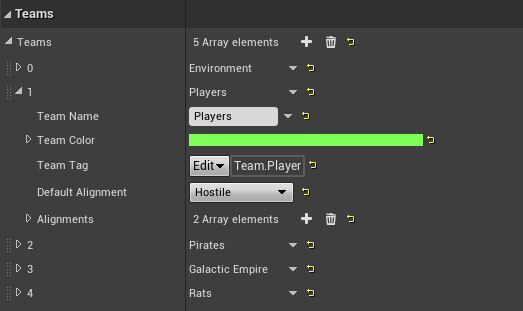 Example of the TeamName displayed in the array list.
That’s it! Now your arrays in the editor are far easier to read! It’s worth reading through the meta-specifier documentation as there are plenty of little tricks available. BenUI has recently created a UPROPERTY page to detail more of these nifty specifiers.