Course at a Glance
- 100+ Lessons and Resources
- CPU, GPU and Memory Optimization
- Real Production Case Studies
- Gameplay and Graphics Learning Tracks
- Lifetime Access
- Instructor Support
- Completion Certificate
- Subtitled in 5 languages
Game performance is one of the hardest parts of Unreal Engine development to learn. Public information is often fragmented, surface-level, or written for older versions of the engine. Even when you find the right profiling tool, understanding what the results mean and deciding what to optimize next can still be difficult.
This course gives you a structured approach to profiling, diagnosing, and optimizing Unreal Engine games across CPU, GPU, and memory. You will learn fundamentally how Unreal renders a frame, how systems interact and are affected by content and tuning and to understand what is causing your bottlenecks and how to optimize once the problems have been identified.
Profile first. Find the real bottleneck. Make changes you can measure.
Optimization is always specific to your project, but the process should never rely on guesswork. The course teaches repeatable workflows, practical tools, and common performance issues seen in many of Unreal’s built-in systems, so you can make informed decisions throughout development, not only when performance becomes a crisis near launch.
What makes this course different?
Learn the optimization process
Start by setting meaningful performance targets, preparing reliable builds, reducing profiling noise, and identifying your bottleneck.
Understand the engine behind the profiler
Profiling tools only become useful when you understand what Unreal Engine is doing. The course connects profiler data to engine architecture, CPU threading, rendering, memory, content, and gameplay systems so you can understand the cost you are seeing.
Study real production problems
See profiling and optimization applied to real games. The case studies show the investigation process, trade-offs, and practical optimizations that are difficult to capture in isolated examples.
Built for AAA and Indie Developers Alike
The course covers a wide range of performance subjects for developers working at different scales. An indie developer can follow the complete curriculum, while specialists at larger studios can focus on the lessons most relevant to their role.
The course is especially useful for:
- Gameplay programmers and technical designers working primarily on CPU performance.
- Graphics programmers, technical artists, and environment artists working primarily on GPU and content performance.
- Generalist developers who need to understand the complete frame.
- Teams preparing a project for new platforms, performance targets, or launch.
- Developers who want to prevent expensive performance problems earlier in production.
No C++ experience is required for most of the course. Programming-focused lessons use C++ where it is relevant, while many sections focus on profiling tools, rendering features, project settings, content, Blueprints, and production workflows.
SUMMER SALE IS NOW!
Use coupon code SUMMERSALE at checkout for a $100 discount! Sale ends September 12th!
What You’ll Learn
Performance fundamentals and reliable profiling
Understand frame time, frame rate, and frame pacing. Learn how to prepare a suitable build, reduce profiling noise, and identify whether your current bottleneck is on the CPU or GPU.
Unreal Engine profiling tools
Use Unreal Insights, ProfileGPU, optimization view modes, render-buffer visualization, Size Map, Reference Viewer, Statistics panels, MemReport, and more built-in profiling tools. Learn what each tool is good at and when to use it.
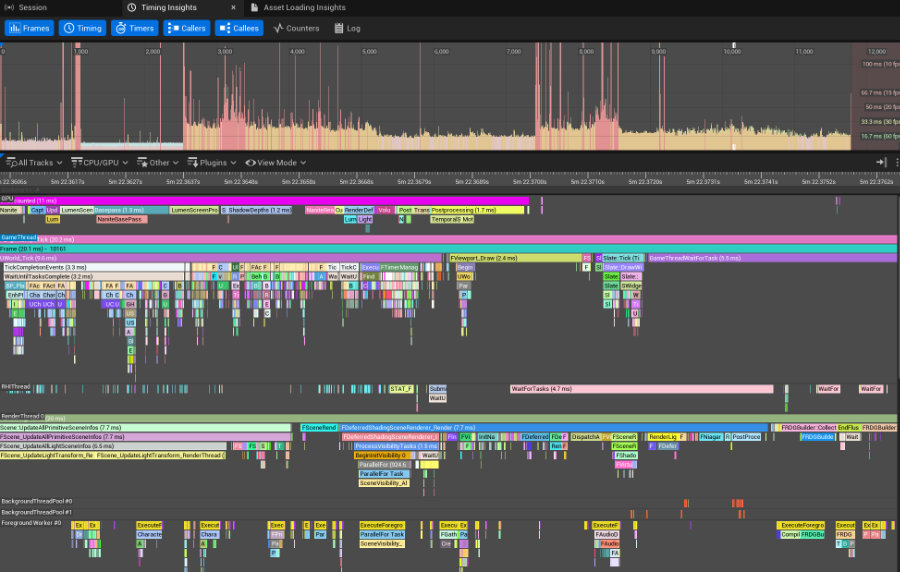
Master Unreal Insights
Unreal Insights is one of the central profiling tools for Unreal Engine.
We deep dive Insights throughout the course to understand CPU, GPU, rendering, and memory performance. You will learn how to capture useful traces, inspect frame and per-call costs, add your own trace events and counters, and connect profiler data back to engine source code or rendering features.
Gameplay, CPU, and memory optimization
Explore Unreal Engine’s threading architecture and optimize gameplay systems including ticks, timers, collision, physics queries, Blueprint code, garbage collection, object lifetime, Actor pooling, Significance Manager, component updates, and multithreading.
GPU, rendering, and content optimization
Investigate expensive rendering features and content using practical profiling workflows. Topics include Nanite, Virtual Shadow Maps, lighting, Niagara, materials, Lumen, PSO caching, Variable Rate Shading, skeletal animation, scene setup, and draw distances.
Platform scalability
Build scalability into the project instead of treating it as a final pass. Learn how to manage settings for different hardware, use detail modes, evaluate automatic scalability, and make deliberate visual and performance tradeoffs.
Real Production Profiling and Optimization
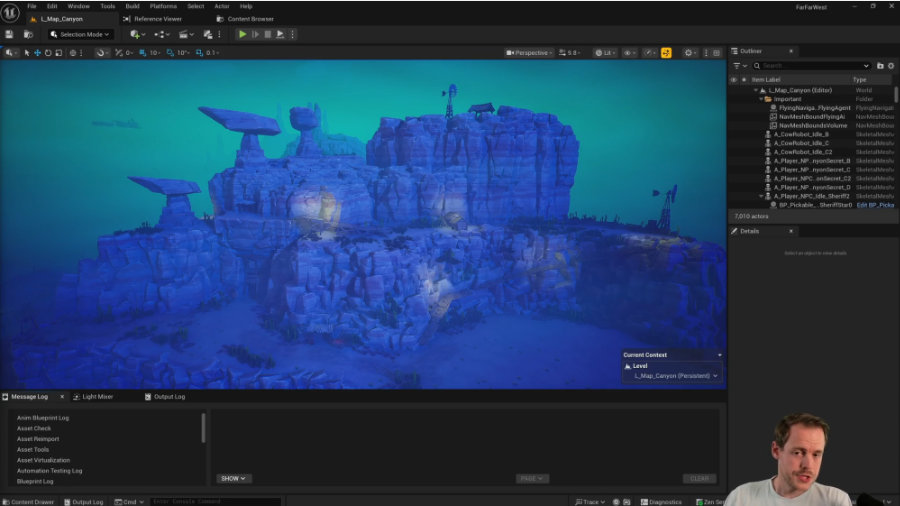
Production Case Studies
The course includes extensive case studies from production games and Epic sample projects. These are complete investigations rather than lists of generic tips. You will see how profiling evidence leads to the next question, how several costs can interact, and how to judge whether a proposed fix is worth its tradeoffs.
Current case studies include:
- Far Far West, including a one-hour GPU profiling and optimization session.
- The Forever Winter, with production examples across gameplay, collision, scene setup, and rendering.
- Sample Projects: Dark Ruins (Environment Art Showcase), Lyra Starter Game (C++ FPS Combat), Project Orion (Showcasing game code optimizations in a substantial C++ Sample Game)
Learning Tracks for Engineers and Technical Artists
Watch the entire course at your own pace or follow the track most relevant to your role:
All lessons are divided into Gameplay and Graphics learning tracks to make it easier to find lessons most valuable to your specialization. This way you can optimize your learning experience.
Continuously Updated for Unreal Engine 5
The course is available in Early Access and already contains a substantial curriculum. New lessons and production case studies continue to be added, with new material recorded using current Unreal Engine releases. You can browse the Curriculum below to see what is currently available and what is still upcoming.
0. Getting Started 3 lessons
1. Notable Performance Improvements in Unreal Engine Releases 4 lessons
2.1 Performance Fundamentals 3 lessons
2.2 Profiling Preparation 3 lessons
2.3 Tools & Techniques for... 2 lessons
3.1 Profiling Tools - Unreal Insights 10 lessons
- Unreal Insights Overview
- Generating trace files (.utrace) for profiling 9:44
- Unreal Insights Walkthrough 19:56
- 🆕 Tracking Individual Stats (per-call & per-frame cost) - Graph Track 14:15
- 🆕 Bookmarks, Screenshots & Timing Regions 2:21
- Adding Your Own Traces and Counters 6:42
- Investigating Individual Stats in Source Code 12:02
- 🆕 Memory Profiling - Short-Lived Allocations 16:35
- Profiling on Target Hardware (Steam Deck) 6:26
- What's Coming: Memory Insights, RDG Insights, Load Times, and more...
3.2 Profiling Tools - Content & Scene 3 lessons
3.3 Profiling Tools - GPU & Rendering 3 lessons
3.4 Profiling Tools - Memory 2 lessons
3.5 Profiling Tools - Misc. 3 lessons
3.6 Profiling Tools - Third-party 1 lesson
4. The Unreal Engine Architecture 1 lesson
5. Case Studies 8 lessons
- The Forever Winter - Overview
- 🆕 Far Far West - Overview
- 🆕 Far Far West: 1-hour of GPU Profiling & Optimizing 64:57
- Dark Ruins (Megascans Sample)
- Dark Ruins: 1-hour of GPU Optimizations 62:04
- Lyra Starter Game
- Lyra: Improving SceneComponent Movement Cost 15:58
- Project Orion - C++ Action Roguelike Sample Game
6.1 Gameplay Programming - General 4 lessons
6.2 Gameplay Programming - Blueprint Performance 1 lesson
6.3 Gameplay Programming - C++ Performance 1 lesson
6.4 Gameplay Programming - Ticks, Timers, and Timelines 7 lessons
6.5 Gameplay Programming - Multithreading 2 lessons
6.6 Gameplay Programming - Collision & Physics 3 lessons
6.8 Gameplay Programming - Resources & Self Study 2 lessons
7. Memory - Garbage Collection 5 lessons
8. Content - Skeletal Animation 4 lessons
9. Scene Optimizations 8 lessons
- 🆕 Auditing lighting using "Light Mixer" (Dark Ruins Sample) 12:31
- 🆕 Mesh-To-Collision Tool - Creating better Mesh Collisions 12:27
- 🆕 Map Audit - Optimizing World Collision Data (The Forever Winter) 42:36
- 🆕 Map Audit - Mesh Mobility (The Forever Winter) 3:48
- 🆕 Auditing GlobalDistanceField Updates 5:04
- Deferred Decals (Component) 13:06
- Mesh Decals (Notes & Best Practices)
- Draw Distance Culling 10:46
10.1 Rendering - General 1 lesson
10.2 Rendering - Nanite 5 lessons
10.3 Rendering - Virtual Shadow Mapping 5 lessons
10.4 Rendering - Lighting 2 lessons
10.5 Rendering - Niagara Effects 2 lessons
10.6 Rendering - Materials 2 lessons
10.7 Rendering - Lumen 1 lesson
10.8 Rendering - PSO Caching (Windows DX12) 5 lessons
10.9 Rendering - Variable Rate Shading 5 lessons
10.10 Rendering - Resources & Self Study 1 lesson
11. Platform Scalability 3 lessons
12. UI - Slate & UMG 1 lesson
Your Instructor: Tom Looman

Game developer with 17+ years of programming and Unreal Engine experience at studios including Epic Games and as an indie developer along with many years of contract work focusing on gameplay programming with C++ and game optimization (Far Far West, The Forever Winter, The Talos Principle 2, Deliver Us Mars, Tales of Kenzera: Zau among others).
I have written Unreal Engine tutorials & guides professionally for well over 10 years on a wide range of topics with a focus on C++, graphics, and game optimization.
Besides working on games, I am an online instructor for AAA studios and Indies and have taught a curriculum at Stanford University on C++ Game Development with Unreal Engine.
SUMMER SALE IS NOW!
Use coupon code SUMMERSALE at checkout for a $100 discount! Sale ends September 12th!
Get Started Today
Prices include VAT/Sales tax where applicable.
Training for Studios
Discounted partner pricing is available for multiple licenses, with flexible enrollment and invoice payment for studios. See the Studio Pricing and Partner Tiers or contact info@tomlooman.com to discuss your needs.
Need a single license for someone on your team? During checkout, choose the option to purchase the course for someone else.

Questions?
Feel free to use the contact form below or email me directly at info@tomlooman.com.